
Categories
General

flickpress 1.5

Bug fix! Tarique and Falko noticed that having more than one phpFlickr-based plugin enabled at once can result in conflicts. Rather than figure out how to check for the library (and version – conflicts there too) I’ve opted to rename some things in the version of phpFlickr included with flickpress. This should avoid any conflicts, so let me know if you’re still seeing errors.

Another bug fix! Ben noticed a bug that led me to test inserting a bunch of different photos. I finally ran into trouble with this adorable kitty, which has a title that’s got quotes and a description with a variety of fun characters. It turns out I was using the wrong PHP function to escape text – PHP’s rawurlencode seems to go with JavaScript’s unescape. I hope so at least – let me know if you find any photos that won’t insert or if you get unexpected characters in captions.

New feature! You can now browse a user’s favorites. I like to use favorites to bookmark photos to use in posts – it’s nice to be able to get to those right in flickpress.

You can get flickpress from the WordPress Plugins Directory.

…or right here: flickpress_1.5.zip
Categories
photos

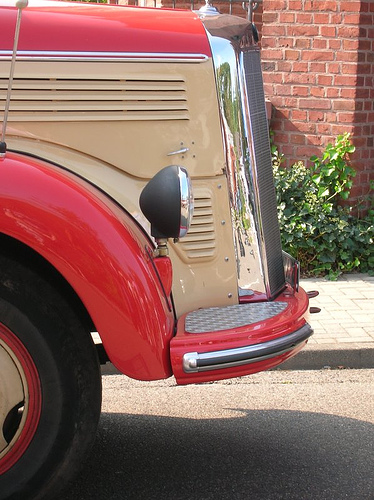
The wedding bus

When our German friends got married they hired this old colorful bus to take guests to the church and reception hall.

Categories
photos

Wet window

Seattle greeted us in style with some nice rain.

Categories
General

Birthdaze 0.4

I’ve been using an embedded Google Calendar instead of this plugin for my family site so it hasn’t been getting much attention lately. Vac posted a comment asking about a couple of changes to make the plugin a little more flexible – having options to show full last names and to remove the “th,” “nd,” and so on from the displayed dates. This release adds those options to the widget and template functions. For extra fun, I also added a shortcode to make adding a birthday list to a page or post much easier. Check the readme for details on how to use it.

Download it: birthdaze_0.4.zip

Categories
General

Converting a PNG to a PDF

Why I wanted to do this: I got an IRS PDF form from someone. Many of the fields on the form were fillable, but obviously it couldn’t be signed – and the date field also wasn’t fillable. So, I could have just printed it out, completed it, then mailed it, but this is 2010 fergawdsakes! I know that Adobe thoughtfully sells just the tool for the job, but that’s no fun at all.

I knew I could import the PDF into Gimp (converting it into a bitmap) and edit it there, dropping in my signature and whatnot. Next I needed to turn the bitmap back into a PDF. Gimp doesn’t make PDFs, so I saved the bitmap as a high-res PNG and went looking for something to convert a PNG into a PDF.

ImageMagick should have immediately occurred to me, but I needed Google to connect the dots. Here’s the command I figured out after some trial-and-error:

convert -page Letter -density 28.3 input.png output.pdf

Note that the 28.3 part was specific to the resolution of my PNG. Using other values, when I checked the PDF’s properties the dimensions weren’t 8.5×11 – so I just tried numbers until I got close enough. I’d imagine there’s an automated way to do the calculation, but for just one PDF trial-and-error worked fine for me.