
Yay, a photo! There are a couple of trees with these extra-garish leaves on our usual walk through Rock Creek Park. Oliver isn’t very interested in stopping to look at them unless there are some hanging low enough to grab and eat.
Categories
 Isaac's cool blog
Yay, a photo! There are a couple of trees with these extra-garish leaves on our usual walk through Rock Creek Park. Oliver isn’t very interested in stopping to look at them unless there are some hanging low enough to grab and eat.
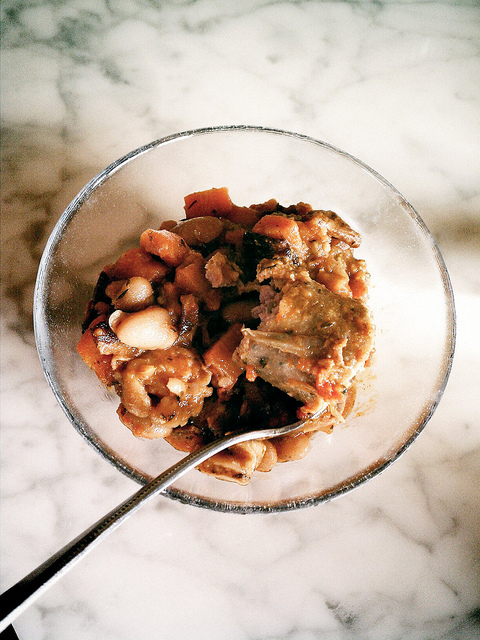
I know what you’re thinking: “Isn’t pork and beans something Yogi steals from overweight campers?” Maybe, but what if you want to relive the teenager experience of eating whatever you want, but want to do it in a way that fits in with your current gourmet tastes? After all, what is cassoulet but high class pork and beans? Let’s make some classy pork and beans!
Preheat oven to 300-ish F. Sauté onion, carrots, celery, whatever you’ve got around in bacon fat. Even better, start by rendering some chopped bacon or lardons and soften the vegetables in that. Add about four sausages. Add a can of diced tomatoes or a couple of tablespoons of tomato paste. Add a regular-sized can of beans, cannellini preferred. Add spices like Dijon mustard, cumin, thyme, etc. Once it’s bubbling, cover and bake an hour-ish. Cut up the sausages into bite-sized chunks and serve.
Update! It’s not exactly pretty, but here’s a photo of a bowl of it:
I’m working on an update to flickpress so it’s compatible with WP 3.3. I decided to upgrade to the latest version of phpFlickr, but started getting an error when browsing my favorites, something like this:
unserialize(): Error at offset 3400 of 8999
I tracked it down to a Japanese character in one of the photo titles and unserialize in phpFlickr. It was my fault though: the MySQL table that flickpress was installing didn’t specify a character set. I finally figured out that setting the table’s character set to UTF-8 would make unserialize happy. To do this with dbDelta, WordPress’ handy database table install/upgrade function, I changed my CREATE TABLE SQL to look like this:
CREATE TABLE table_name ( column1 CHAR( 35 ) NOT NULL ) DEFAULT CHARACTER SET UTF8;
To generalize, if you’re getting an unserialize error on data stored in a database, take a look at the table’s character set.
I was trying to get non-NetworkManager networking running in Fedora 15, but kept failing. When I tried to start the network daemon it failed and something about eth0 missing got logged. Finally, I looked more closely at my dmesg output and noticed that at the end of the network section udev had renamed the interface from eth0 to something like p7p2. Changing my networking script to use that instead fixed it.
I finally got nginx to work with WordPress at Dreamhost, so I’m moving more domains (including this one) over to it. When you edit a domain in the panel at Dreamhost there’s a handy-looking way to move from one PS to another, including moving all of the files. Sadly, I don’t think it’s ever worked for me. Here are the issues I’ve encountered and their solutions: